

Unlocking Efficiency in Asset Management: Introducing 'Bookings' (Beta)


'Bookings' offers a comprehensive solution that allows asset managers and self-service users to reserve a group of assets for future dates, ensuring that every piece of equipment is used to its full potential without the risk of double-booking. This feature is not just about booking; it's about ensuring the right asset is available at the right time for the right person. Here's how it works:
Unlocking Efficiency in Asset Management: Introducing 'Bookings' by Shelf
In the realm of asset management, efficiency and clarity are paramount. Shelf, the open-source asset management platform, has long provided organizations with the tools to track long-term custody of assets with precision and ease. Today, we are thrilled to unveil our latest innovation – the 'Bookings' feature, a transformative addition that reshapes how assets are reserved and managed for short-term use.
The Inspiration Behind 'Bookings'
Our journey began with a simple insight: asset managers needed a more streamlined way to handle short-term asset reservations and bookings. Prior to 'Bookings', Shelf excelled at tracking which team member had custody of long-term assets, such as assigning a laptop to a specific individual. However, the need for a system that could handle temporary asset allocation, such as loaning out equipment for events or projects, was clear.

What 'Bookings' Solves
'Bookings' offers a comprehensive solution that allows asset managers and self-service users to reserve a group of assets for future dates, ensuring that every piece of equipment is used to its full potential without the risk of double-booking. This feature is not just about booking; it's about ensuring the right asset is available at the right time for the right person. Here's how it works:
Asset Availability Check: Before making a reservation, Shelf checks if the assets are already booked or available for the requested date and time.
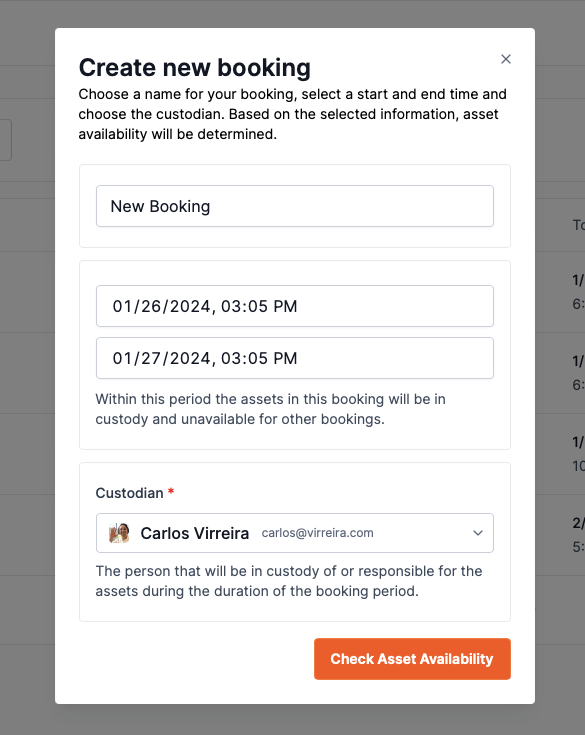
Fill in all details to check available assets for those exact dates
Notification System: When a booking is requested, asset managers receive an email notification with all the details, including the booking period and the items requested.
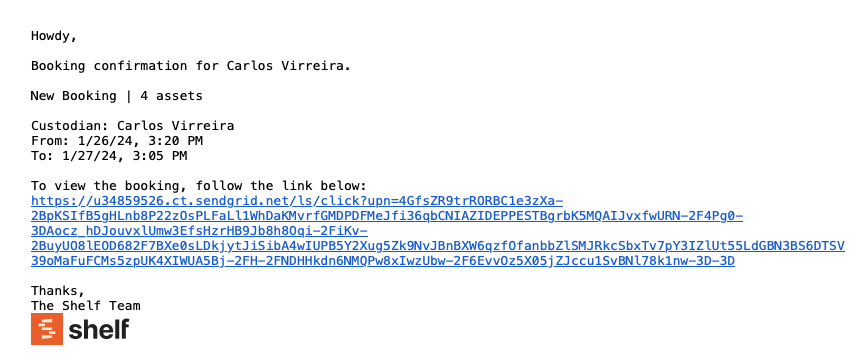
Reservation & Check-Out Confirmation: On the date of the booking, the manager can mark assets as checked out in Shelf, and users receive confirmation.
Reminders: Users get reminders to return the assets, fostering responsibility and punctuality.
Real-World Applications
The 'Bookings' feature is versatile, serving numerous scenarios:
- Marketing Departments: Reserve promotional materials for events and ensure their timely return.
- Creative Agencies: Book gear for video productions, maximizing asset utilization.
- Educational Institutions: Enable students to loan gear for academic projects, fostering a culture of shared resources.
Streamlined User Experience
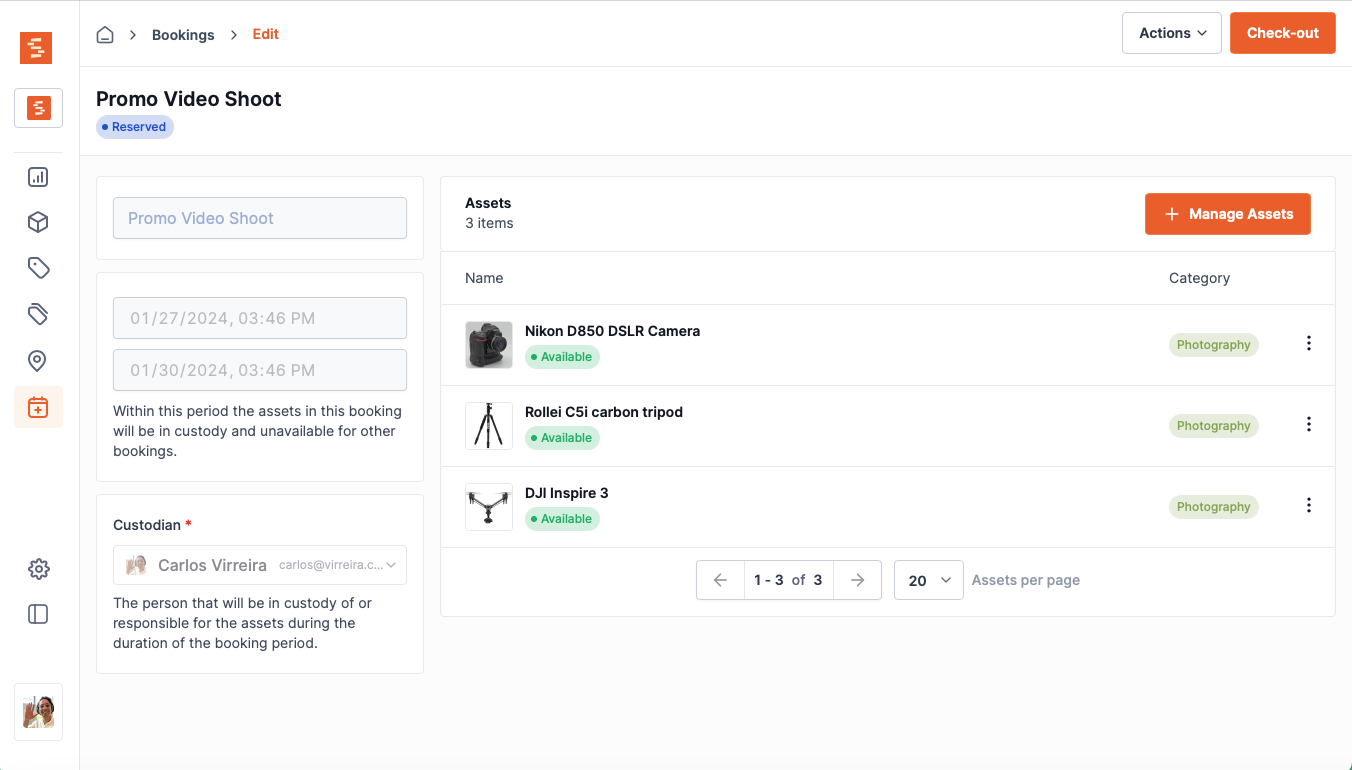
With an intuitive UI, Shelf's 'Bookings' allows users to:
- View assets' availability status at a glance.
- Employ advanced search and sorting capabilities for bookings.
- Assign custodians for accountability.
New user types
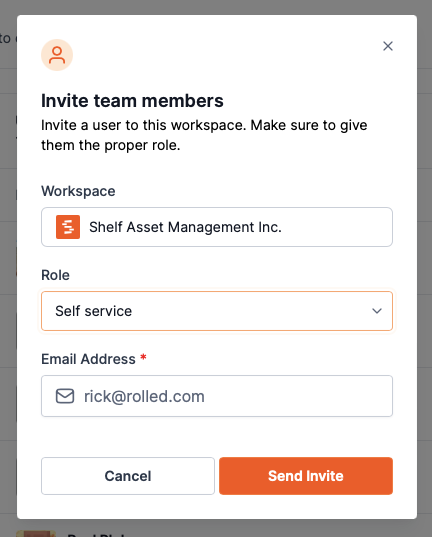
In addition to our 'Admin' and 'Non registered member' user type, we now have introduced the 'Self Service' user type. This is a user type which is created in order to allow for doing booking reservation requests. Self service users can only see limited areas of the application and cannot perform a checkout. They can only request a reservation of items for an asset manager to check out and check in.
The Path Ahead
As stated by our CEO, "At Shelf, we are committed to solving asset-related issues with technology and automations. We heard from hundreds of users that the batch checkout and reminders related to our bookings will save them hundreds of hours a year managing their assets. We are excited to be launching this feature to all of our users on the 'Team' plan."
Join the Revolution
Are you ready to streamline your asset management? Connect with us for a trial and experience the power of 'Bookings' – where efficiency meets innovation.
Ready to organize your assets?
Join thousands of teams who trust Shelf to manage their physical assets. Free forever, or try the Team plan free for 7 days.
Out in the field? Shelf Companion is free on iPhone & Android.
More from the blog

Take Control of Your Booking Notifications
Shelf now lets workspace admins configure exactly who receives booking email notifications — at both the workspace level and per booking. Reduce noise, add coverage, and keep the right people informed.

How We Used to Think About Native Apps — and What Changed
In 2024 we wrote a post explaining why Shelf didn't have native apps. In 2026 we shipped one. Here's the honest story of what changed our mind, what stayed true, and what we'd say differently today.

Industry-Specific CSV Import Examples
One of the most powerful features of Shelf is its ability to import existing asset data via CSV files. To help you get started, we've created a set of industry-specific CSV templates that you can use as a starting point for your own asset management journey.