

Asset Search
Full-database search across all asset fields — find any item by name, custodian, category, status, or custom field.
Trusted by innovative teams


































































Finding the right asset should take seconds, not minutes. Shelf's search works across every field in your database — name, custodian, category, status, location, tags, and any custom field you have defined. Start typing and results appear instantly, regardless of how large your inventory is.
Why Search Matters for Asset Management
As inventories grow, finding a specific item becomes the bottleneck. Spreadsheets require manual scrolling or fragile filter combinations. Paper logs offer no search capability at all. Even basic asset tools often limit search to a single field like name or ID.
When teams cannot find assets quickly, they waste time, create duplicate records, or check out items that are already reserved. Fast, comprehensive search eliminates these problems by giving every user immediate access to any record in the system.
How Search Works in Shelf
Multi-Field Search
One search box, eleven places to look. A single term is matched against all of these at once, and an asset surfaces if any one of them hits:
| Type this | Shelf matches |
|---|---|
| A name or a few words from a description | The asset's name and description |
SAM-0042 | The asset's Shelf Asset ID |
| A QR code ID, or a barcode value read off a label | The asset's QR code and any barcode on it |
Cameras, Studio B | Its category, and any location it is placed in |
Dell Latitude 5550 | The asset model it belongs to |
fragile, on loan | Its tags |
| A colleague's name | Whoever currently has it in custody. The name you see on the row is the name that matches, so a colleague who has set a display name is found by that |
| A serial number, PO number, warranty date | The values recorded in your custom fields |
Two details worth knowing. An asset stocked across several locations is found by any of them, not only its main one. And you can separate up to ten terms with commas to match any of them, so studio a, lens returns everything in Studio A alongside anything named "lens".
Results come back in whatever order you have the list sorted by, so a search is a filter over your existing view rather than a separate ranked results screen.
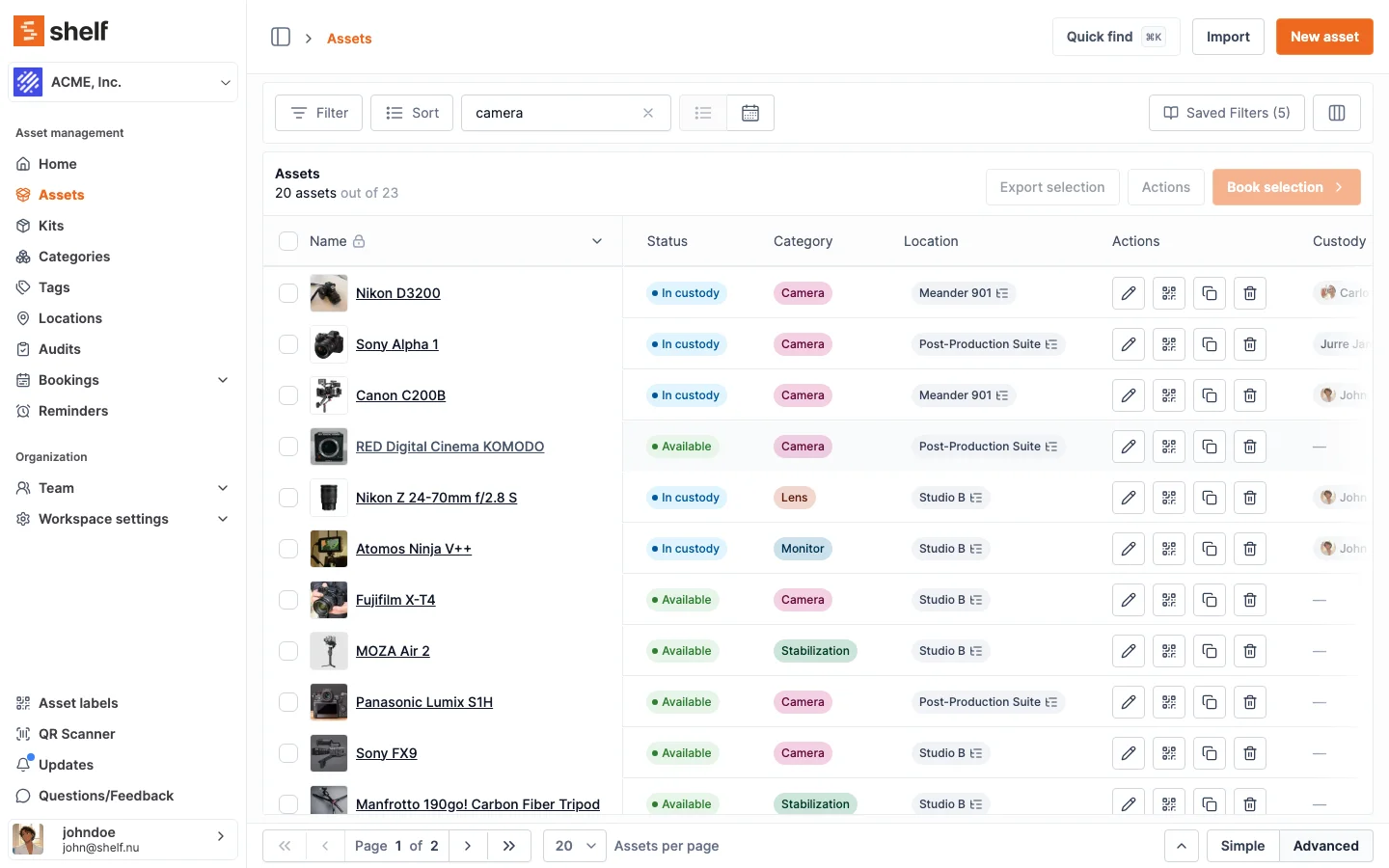
Custom Field Support
If your organization tracks assets with custom fields — such as warranty expiration, purchase order number, or condition rating — those fields are fully searchable. There is no distinction between built-in fields and custom ones when it comes to finding what you need.
Instant Results
Search results appear as you type. There is no need to press enter and wait for a page reload. This makes search practical for high-volume environments where staff check availability dozens of times per day.
Works at Any Scale
Whether your database contains 50 assets or 50,000, search stays quick. Each of the sources above is looked up separately, narrowed to your own workspace first, and served by its own database index, including the custom field values. A workspace with 14,000 assets searches in roughly the time a small one does.
Saved Filter Presets
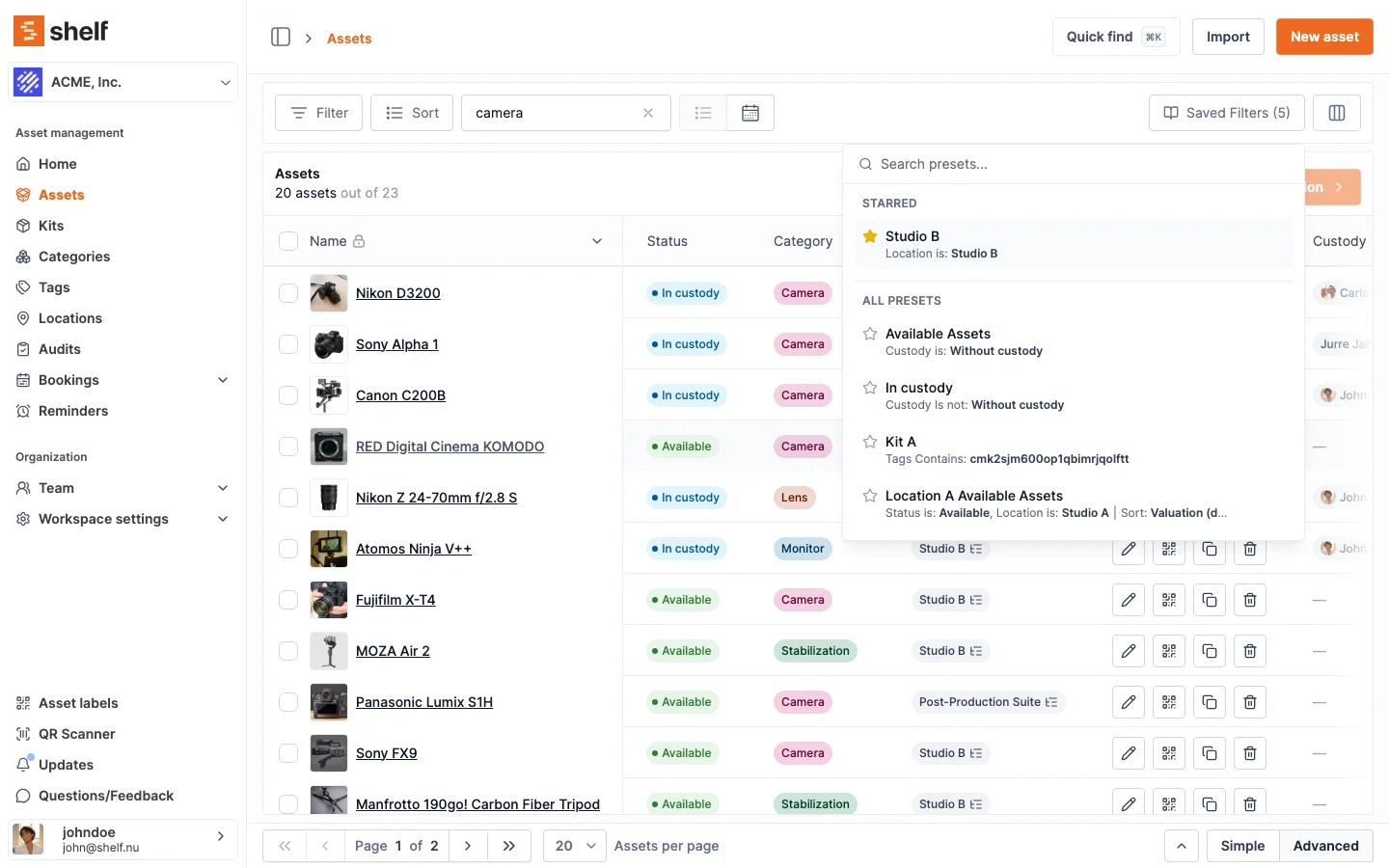
Common searches become reusable filter presets. Starred presets stay pinned for one-click access. Each person builds their own list of views, such as "Available Assets", "In custody" or "Studio B only". To hand a view to a colleague, apply it and send them the page address.
Benefits
- Save time by finding any asset in seconds instead of scrolling through lists
- Reduce errors by searching across every field, including custom ones
- Support self-service so team members can find what they need without asking an admin
- Eliminate duplicates by quickly confirming whether an asset already exists in the system
- Scale confidently knowing that search performance does not degrade with inventory growth
Common Use Cases
- IT teams: Search by serial number or assigned user to locate a specific laptop or monitor.
- Operations managers: Find all assets assigned to a particular location or department.
- Equipment rooms: Search by category to see every available camera body or tripod.
- Compliance audits: Locate assets by warranty status, purchase date, or condition rating.
Related Features
Ready to organize your assets?
Join thousands of teams who trust Shelf to manage their physical assets. Free forever, or try the Team plan free for 7 days.
Out in the field? Shelf Companion is free on iPhone & Android.