

Install Shelf Asset Management on Your Phone or Desktop
Add Shelf's asset tracking app to your phone or desktop in seconds — no app store needed. Progressive web app for iOS, Android, macOS, Windows, and Linux.

Shelf is an asset management platform for asset tracking, custody, bookings, and QR-code-based operations. You can install it as a progressive web app (PWA) on any phone or desktop for quick access — no app store download required.
Not what you're looking for? Shelf Asset Management is a different product from similarly-named apps on iOS and Android. If you're searching for a social media shelf, a book/movie cataloguing app, or a Pinterest companion — those are separate products by other companies.
The free Shelf Companion app is live on the App Store (iPhone) and Google Play (Android) — a native experience for field work: scan QR codes, run live audits, manage custody, and check bookings in and out. It pairs with your existing Shelf account. On desktop or in any phone browser, the web app (below) remains the full platform.
Running your own Shelf server? From version 1.5.0 the app can sign in against a self-hosted instance instead of Shelf Cloud. See Connect Shelf Companion to your own Shelf server.
The PWA works great for day-to-day asset management on any device. For field-specific workflows on iPhone and Android — barcode scanning, live audits, and custody handoffs — the Shelf Companion app is purpose-built; the web app remains the complete platform everywhere else.
Install on iOS (Safari)
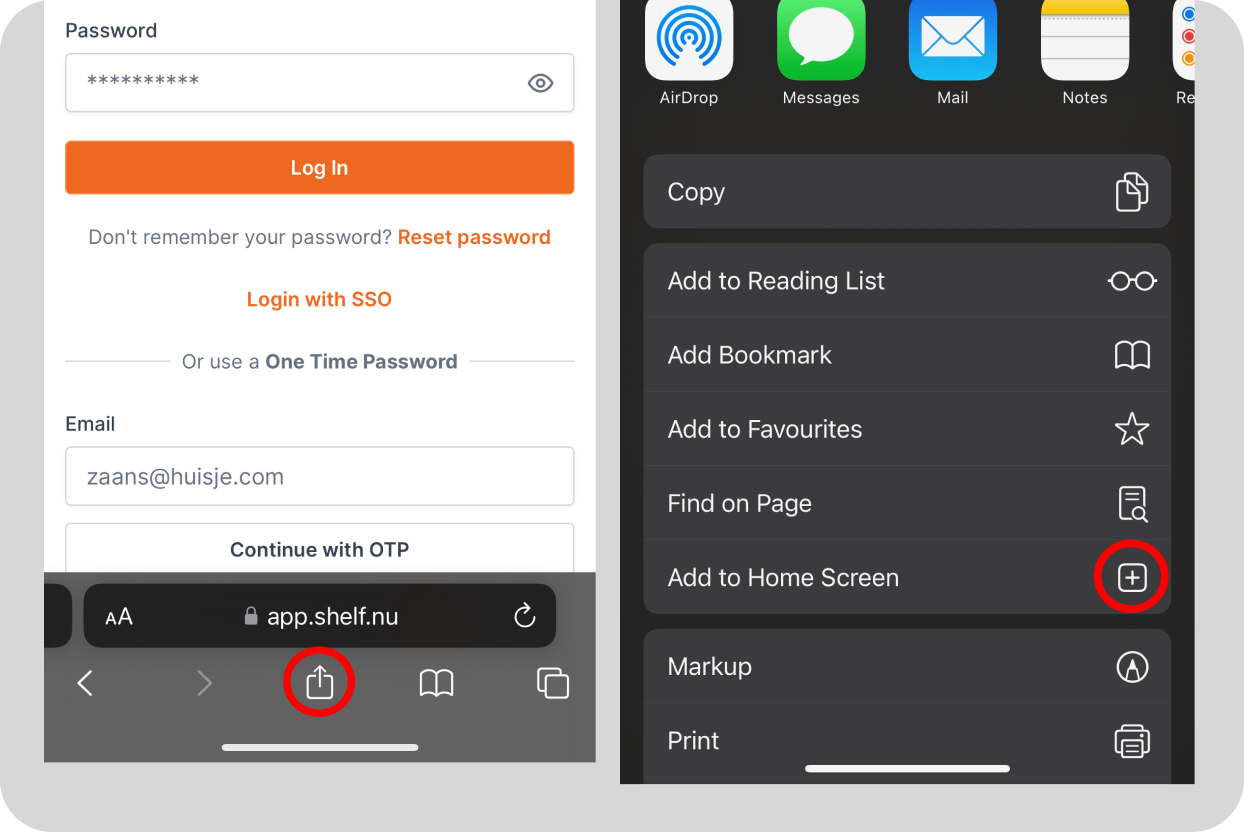
- Open Safari and navigate to app.shelf.nu
- Tap the Share icon (square with an arrow) at the bottom of the screen
- Scroll down and tap Add to Home Screen
- Name the app and tap Add
Install on Android (Chrome)
- Open Chrome and go to app.shelf.nu
- Tap the three-dot menu in the top right
- Select Add to Home screen
- Tap Install
- Open the Shelf icon on your home screen
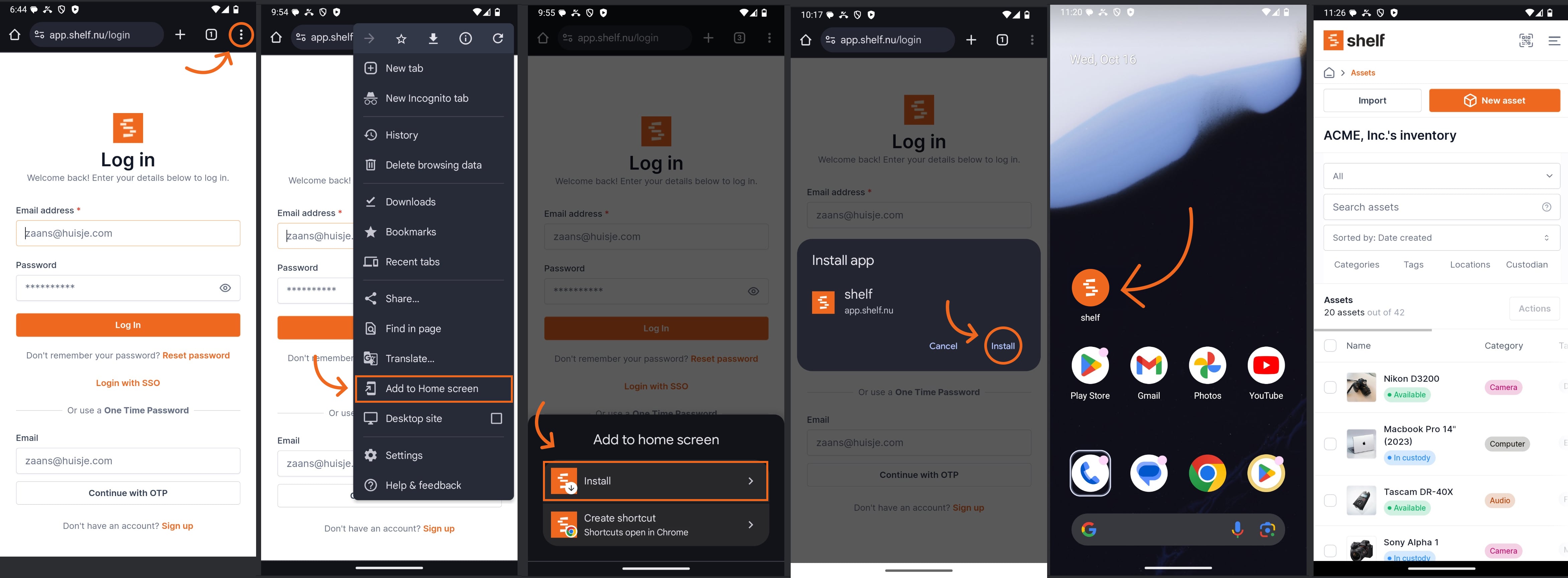
Note: The exact steps may vary slightly depending on your browser version and device settings.
Install on Desktop (macOS, Windows, Linux)
Most Chromium-based browsers (Chrome, Edge, Brave) support installing web apps:
- Open app.shelf.nu in your browser
- Look for the Install icon in the address bar (or open the browser menu → Install Shelf)
- Confirm the install
- Shelf opens in its own window and appears in your dock, taskbar, or application launcher
See also: Add Shelf to your Dock, Taskbar, or Homescreen for platform-specific details.
Supported Browsers
Shelf runs in Chrome 98, Edge 98, Firefox 94 and Safari 15.4 or newer, on any device. An older browser shows a Your browser is out of date screen instead of the app. See Troubleshooting: Your Browser Is Out of Date.
The table lists the browsers you can install Shelf from as an app:
| Platform | Browsers |
|---|---|
| iOS | Safari, Chrome |
| Android | Chrome, Firefox, Samsung Internet, Edge |
| Desktop | Chrome, Edge, Brave, Arc (any Chromium-based browser) |
What the PWA Can Do
- Scan QR codes using your phone's camera
- Check assets in and out via custody workflows
- Browse and search your entire asset database
- Create and manage bookings
- View custody history, reminders, and activity logs
The PWA runs in your browser engine — it's the same Shelf you use on desktop, optimized for your screen size. No separate account, no sync issues, no app store updates to manage.
Related Articles
Ready to try Shelf?
Put what you're learning into practice. Free plan available — no credit card required.