

Custody Feature for Long-Term Equipment Lend-Outs
The custody feature functions like an indefinite checkout system, allowing organizations to track which team members have borrowed assets without specifying return dates or locations.

Using the Custody Functionality
Asset custody operates as an infinite checkout mechanism. You can document which assets have been borrowed and by whom, without requiring return dates or location specifications. This functionality proves valuable for assets borrowed for brief or extended periods.



Assigning Custody of an Asset to a Team Member
- Navigate to your Assets and select an asset from the index
- Click Actions, then select Give custody
- Choose a team member to receive custody over the asset
The Actions button reveals the Give custody option.
Releasing Custody of an Asset
When a custodian returns the asset to the equipment room and you wish to make it available again, you can release custody.
- Go to the asset page
- Click Actions and select Release custody
The Actions button displays the Release custody option.
Note: Assets in custody display a blue status badge. Releasing custody clears that hold. The asset returns to Available unless something else is still holding it, which is covered below. If the asset is in custody because its kit is, the release is refused and you release the kit instead. See Custody a kit put there belongs to the kit.
Where You Can See Who Holds an Asset
Custody is not only visible on the asset itself. Every list that answers "where is my gear" carries the custodian too:
- The asset page, where the blue In custody badge sits beside the status and the Custody card on the overview names the holder. For an asset checked out on a booking, the same card reads In custody of the booking's custodian via the booking, Since the booking's start.
- The Assets index, in its Custody column.
- A location's Assets tab, in its Custodian column, so you can see at a glance which items stored there are already spoken for. This column is the broader one: it names whoever is holding the asset, whether that is a direct custody assignment or a booking it is checked out on.
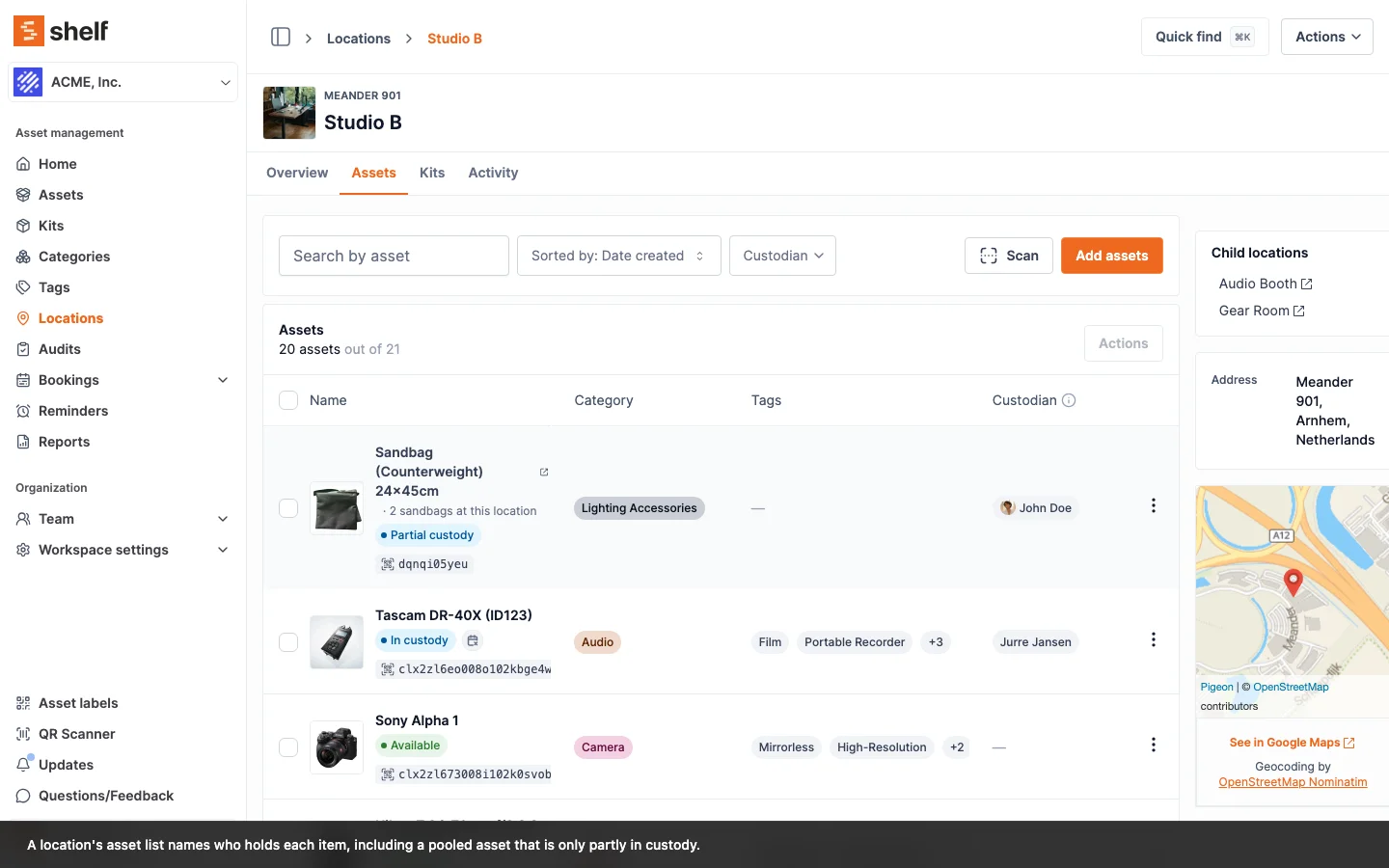
An asset that several people hold units of shows its primary custodian wherever a list has room for one name, alongside a Partial custody badge. Open the asset for the full picture: the Quantity Overview card breaks the pool down by what is in custody, in kits, checked out and available.
What Self-service and Base users see here follows the workspace's custody-visibility setting. With it off, a grey private badge stands in place of the name and the custodian filter is refused, so a list cannot be used to work out who holds what. Administrators and Owners are unaffected. See Configure What Self-service and Base Users Can See.
Custody and Bookings Are Separate Commitments
An asset can be spoken for in two independent ways: someone holds it in custody, or a booking has checked it out. Custody never decides the outcome of a booking, and the two are now kept strictly apart.
You cannot give custody of an asset that is checked out. Try it and Shelf refuses with "[Asset] is currently checked out on a booking, so it cannot be given to a custodian. Check the booking in first." An individually tracked asset is one physical item, so a custody claim while it is out on a booking is a genuine conflict rather than something to quietly allow.
Releasing custody does not check a booking in. If an asset is both in someone's custody and checked out on a booking, releasing the custody leaves it Checked out. It does not go back into the available pool while it is physically out on a job. Check the booking in to complete the return.
A kit takes what it can. Assigning custody of a kit gives its members to the custodian, except any member that is currently checked out on a booking. Those members keep their Checked out status, and the kit's custody applies to the rest.
A kit itself is one unit with one holder. A kit in someone's custody cannot be checked out on a booking, whatever its members are, and a kit that is checked out, or still out on another live booking, cannot be given a custodian. The Check out button on a booking holding such a kit is disabled with "Some kits in this booking are currently in custody. Release their custody before you can check-out", and Assign custody on a checked-out kit is refused with "Cannot assign custody. Some kits are checked out on a booking: Camera Kit A. Check them in first." Adding a kit in custody to a booking and reserving it stay allowed; the refusal comes at check-out. See A kit in custody stays home.
The rule in one line: checked out outranks in custody, which outranks available. Only the booking flow can take an asset out of Checked out.
Custody a Kit Put There Belongs to the Kit
Giving a kit to someone puts every member asset into that person's custody too, and each of those holds is recorded as coming from the kit rather than from an operator. Those two origins are now kept apart.
A member cannot be released on its own. Open a kit member and choose Release custody and Shelf refuses, under the heading "Custody is managed by the kit", with "This asset is in custody because its kit is. Release the kit's custody instead." The same refusal answers the bulk Release custody action on the assets index and the Shelf Companion app, which had been offering a live Release custody button on any kit member. Before this, releasing a member that way left the asset reading Available while the kit page still said it was in Alice's custody and still listed it as a member.
A member the kit is already holding cannot be handed to someone else either. Assigning custody of that asset to a different person is refused with the same message, for the same reason: the kit has it. A kit member whose kit is not in custody has no kit-derived hold on it, so assigning custody to it directly works as usual.
There are two ways to end a kit-derived hold, and both go through the kit:
- Release the kit's custody. Every member hold it created clears with it.
- Take the asset out of the kit. The kit's hold on that asset goes with it, and the asset returns to Available unless something else, an operator-assigned custody or a booking, is still holding it.
Custody you assigned to an asset directly is untouched by any of this. It releases exactly as it always did, including on an asset that is also a kit member and carries both kinds of hold at once. In a bulk Release custody across a mixed selection, nothing is released at all if any asset in the selection is held by its kit: the whole action is refused rather than half applied, so you never end up with part of a batch released and no record of which part.
The batch scanner already reached part of this. Its blocker list names individually tracked assets that are part of a kit for both Assign Custody and Release Custody, and it always has. That check reads kit membership rather than where the hold came from, so it was never the same rule, and it was the only place the rule existed. The refusal above is what the asset page, the bulk index action and the app were missing.
Quantity-tracked pools work differently and are unaffected. A pool can be held by several custodians at once and by a kit at the same time, so Assign and Release Quantity Custody act on one custodian's slice by name. Releasing your own slice never touches the units the kit is holding, and the kit's slice still clears only through the kit. The batch scanner follows the same split: a pool whose only held units came with its kit is listed as held through a kit, with the advice to scan the kit's QR instead.
Quantity-Tracked Pools Can Be Both at Once
A quantity-tracked asset is a pool rather than a single item, so both commitments can be true of the same asset at the same time: 20 units with a custodian, 5 out on a booking, the rest on the shelf. Each figure is counted on its own row of the Quantity Overview card, and Available is what is left after all of them.
For the same reason, a booking that draws on the free units of a pool is a valid booking. The bookings list does not flag it as containing unavailable assets just because some other units of that pool happen to be in someone's custody. If the booked quantity genuinely exceeds what is available, that shows up as its own stock warning on the item's row. See Troubleshooting booking conflicts.
A pool kept at two or more locations also records which location each hold assigned on the web came from; custody assigned from the Shelf Companion app is recorded as location not recorded. The Assign Quantity Custody dialog asks From location, pre-filled with the location that has the most units left and capped at what it has; the custody list shows the location after each person's quantity; and a hold ended with Mark as consumed takes the used-up units off that location. A location's Assets tab shows how many of a pool's units are in custody from there. See Which location the units come from.
Important
Only individuals with appropriate custody permissions can grant or remove custody from assets.
Related articles
Ready to try Shelf?
Put what you're learning into practice. Free plan available — no credit card required.