

See Your Assets by Model, and Book From There
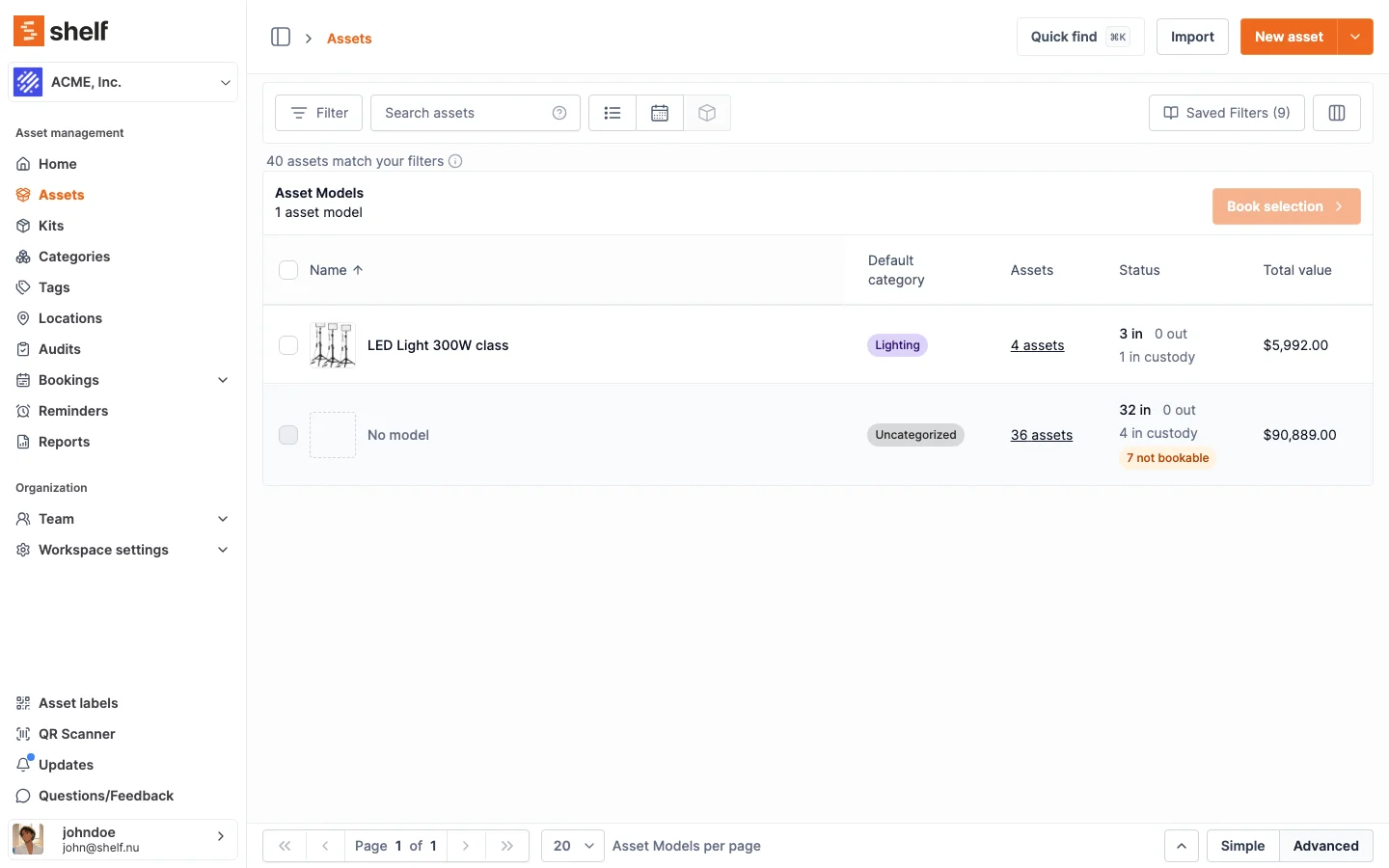
The advanced asset index has a third view that lists asset models instead of assets, counted over your current filters, with each model's units one click away and a Book selection button that reserves models on a new or open booking.
The advanced asset index now has an Asset model view, next to the list and availability views. It lists your asset models instead of individual assets: for each model, how many of the assets matching your filters carry it, where they are right now (in, out, in custody, plus how many are not bookable) and their total value. Your filters, saved filters and search all apply (except Low stock only, which the view clears), so filtering to one location tells you which models you have there and how many. Assets without a model sit together in a No model row at the bottom, which is a handy place to start grouping a fleet.
Click a model's count to open a side panel with the assets behind it, in the columns you have set up for the list. Tick one or more models and use Book selection to create a booking that reserves units of them, or to add them to an open booking, with the number still free for that booking's dates shown beside each model.
The view counts individually tracked assets only, because asset models do not cover quantity-tracked stock.
Ready to organize your assets?
Join thousands of teams who trust Shelf to manage their physical assets. Free forever, or try the Team plan free for 7 days.
Out in the field? Shelf Companion is free on iPhone & Android.